
Before opening Binance.com, check whether its service is available for your actual residence and the product you intend to use. Then prepare a long-term login method, your identity documents and the referral information you want to enter.
Here is the whole path in order. The screenshots further down are public pages captured in August 2026; the form in front of you decides the details.
- Check eligibility. Make sure your country is not on the list of places Binance.com does not serve, and answer residence questions with where you actually live.
- Pick a signup method. Use an email address or phone number you control and expect to keep.
- Enter the verification code. Type the one-time code sent to that email or phone into the official form, and nowhere else.
- Set a password. Make it unique; do not reuse your mailbox password.
- Fill the referral field before the final submit. If you want to use a code, paste it into the Invite/Referral field and check it. HuiBonus uses BN5785.
- Complete identity verification (KYC). Select your residence, enter details that match your document, upload it and finish face verification.
- Turn on 2FA. Set up an authenticator or another supported strong method and store the recovery information safely before the first deposit.
Establish registration eligibility first
Read any notice about residence or a different service entity before filling the form. A form that stays visible after you dismiss a notice does not make the application eligible.
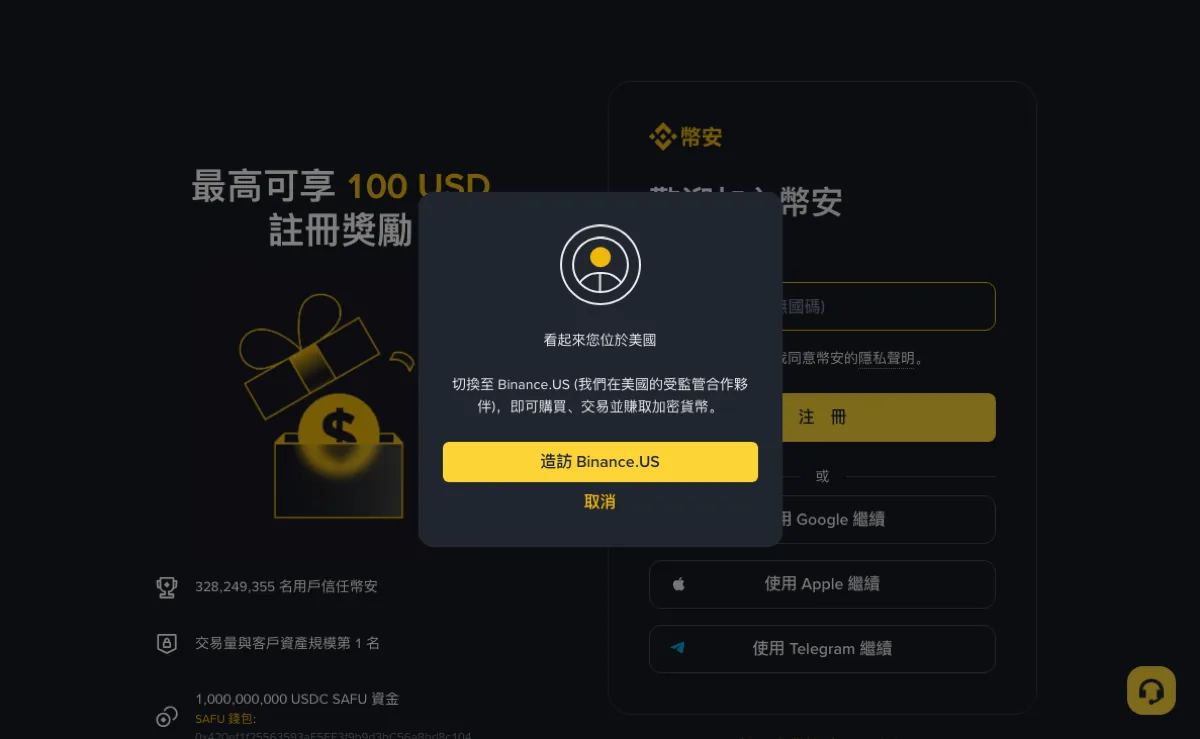
Residence, citizenship and the country that issued your document can differ. Enter each accurately. A hotel connection or short trip does not make you a resident of the location detected by the website.
If the page directs you to another entity, check that entity's terms, products and registration process. Do not assume your international account, security methods or referral information transfer to it. The region and access guide explains how to separate those checks.
App-store availability is also distinct from account eligibility. Use official download information and avoid packages or account sellers promising to bypass a restriction.
Do the signup in one sitting on a device you control, with the chosen mailbox or phone at hand and the original ID nearby, so you are not switching devices halfway or asking someone else to receive a code. Read the terms and privacy information in the flow before accepting them. A referral option is a commercial choice; it does not change the terms you accept with the exchange.
Check the invitation field before submitting
The code belongs in the field labeled Invite, Referral or its translated equivalent. It does not belong in the email box or a message to support. HuiBonus uses BN5785. If you live in one of the excluded regions, the code brings neither you nor us a referral reward.
A referral link may supply the value, but inspect the final registration information after redirects or a change of signup method. If the page does not show the intended relationship, do not treat a previous click as proof it was saved.
Using the code is your choice. Any advertised maximum benefit still depends on the program and account conditions. A referral rebate and a BNB payment discount are separate from the base fee schedule; see the fee and rebate explanation.
HuiBonus is independently operated. The disclosure explains the commercial relationship. We do not complete registration, store account passwords or request verification codes.
Before the final submission, run through the form once more:
| Field or statement | What to confirm |
|---|---|
| Contact address or number | The complete destination is yours, including the phone country code where applicable. |
| Residence and identity information | Each answer describes the fact requested, without substituting citizenship for residence. |
| Invitation information | The intended value is shown, or the relationship has been clarified through the official process. |
| Terms and notices | You understand which service is providing the account and any condition that affects your intended use. |
| Signup method | You know whether access was created through email, phone or a supported third-party account. |
If the form changes after choosing another signup method, review the new form in its own right. Do not assume a value from the previous screen carried over. Equally, a missing field is not proof that no referral relationship exists. Use the official explanation or support process when the interface does not make the result clear.
A copied code is only text until the registration process uses it. After submission, check the account's available confirmation rather than treating the copy button or a saved link as evidence of binding. Avoid publishing a full registration screenshot to demonstrate the result; crop contact and account information from any image shared outside official support.
Choose access methods you can keep
Use an email address or phone number you control and expect to retain. Check that you can log in to the mailbox itself, not merely view an old session on one phone. A work or school address may be withdrawn when your role changes.
Use a unique password and a secure way to store it. Reusing the email password for the exchange means one compromised credential can expose both accounts.
If you use a third-party login option, record which one created the account and how that account can be recovered. Changing devices or losing the linked account may affect access. Check any additional login or recovery options the exchange actually offers.
When a code is missing, follow the current page's alternatives rather than assuming email can replace every SMS requirement. The verification-code guide separates delivery failures from unavailable security methods.
Avoid a phone number borrowed from someone else or a temporary code-receiving service; account access would then depend on them. Never send a password, authenticator secret or one-time code to a person offering to help with signup. If the form says your email or number is already registered, switch to the official login or recovery route instead of resubmitting with slightly altered details.
Prepare the documents requested for your residence
Complete the Verified level before depositing crypto or trading. Open identity verification inside the account. The official verification guide describes selecting residence, entering consistent personal information, submitting a supported document and completing face verification.
| Requirement | Check |
|---|---|
| Document type | It appears in the account's accepted list. |
| Validity and details | The document is valid and its name, number and dates are readable. |
| Photograph | The original is complete, without glare, cropped edges or filters. |
| Face verification | The account holder follows the current capture and movement instructions. |
| Additional evidence | Address or other files meet the requested type, name and date conditions. |
Enter information that matches the document you submit. Do not combine an old name with a new document or use someone else's ID. For passports, keep the complete information page and its machine-readable area visible. See document preparation for the individual checks.
Verification approval does not mean every product or limit is permanently available. Read the account's current permissions and any later request to update information.
Check the document before opening the camera
Read the accepted document list shown for your residence and the selected issuing country. Choose a document you can supply in the requested original form. A document being government-issued or still unexpired does not by itself guarantee that the selected verification route accepts it. Additional type or validity conditions may appear in the account's instructions.
Place the document on a plain surface with even light. Check every required side or page, including the edges and small text. Glare over the number or expiry date can make an otherwise sharp photograph unusable. Move the light or document and take a new photograph instead of editing the image to reconstruct obscured information. Do not submit a screenshot of an old photograph when the flow requests a live capture of the original.
Resolve name and document mismatches before submitting
Compare the personal details entered in the form with the document actually selected. Check the order of names, date fields and document number carefully; a browser's saved form data can belong to an earlier document or another application. Follow the form's instructions for scripts and transliteration. Do not invent a spelling merely to fit an example in a tutorial.
If your name or identity document has changed, use the account's official correction or update process. Keep the old and new facts distinct and provide supporting evidence only through the requested secure channel. An account-information problem should not be concealed by choosing a different document type that happens to avoid the conflicting field.
Prepare for face verification without changing the image
The account holder must complete the requested face check. Use clear lighting and follow the on-screen directions about face position and movement. Remove items that obscure the face when instructed, and avoid filters or other alterations. The aim is a usable capture of the person being verified, not a more flattering picture.
If the camera does not open, distinguish a device-permission problem from a failed identity result. Check the browser or app's camera permission for the official flow, then follow its retry instructions. If a capture was submitted and the application is now under review, opening the camera again is not evidence that another submission is needed.
For any additional address evidence, check the requested document type, name, address and permitted issue date before uploading. A file's readability and its eligibility are separate checks: a clear document can still be the wrong kind. Do not send extra financial records simply because you have them; provide the evidence the verified process requests.
Identify where the process stopped
- No verification code: inspect the destination and delivery method.
- Under review: follow the submitted application's status and notifications.
- Rejected: read the reason before replacing a document or photograph.
- Region notice: check the entity and service requirements.
- Logged in but a function is unavailable: read that function's account restriction rather than assuming the website failed.
Save the submission time and message. Repeatedly uploading an unchanged photograph does not correct it. The rejection guide explains how to respond to file and information problems.
Open the account yourself to verify any email requesting more identity evidence. Do not send documents to a private contact offering faster approval.
Follow the status attached to your own application; someone else's approval time tells you nothing about yours, and this guide does not promise a review time. If an email asks for more documents, open the account yourself and answer the request shown there. A private message offering faster approval, or asking for payment, is not a review requirement. If you lose access partway through, use the official recovery route for the account you already created instead of starting a new application.
Review security before depositing
Set up the security options available to the account, including an authenticator or other supported strong verification method. Confirm the setup actually works and securely retain any secret or recovery information the page provides.
Keep recovery information separately from the only device you use to sign in. Test the new device, then follow the app's instructions to remove old-device access. Do not simply delete a synced entry, because deletion can affect other devices too. The authenticator guide explains the distinction.
Review anti-phishing settings and withdrawal-address controls where available. Read any waiting period attached to a security change before confirming. A security feature's presence does not remove the need to check domains and actual withdrawal details.
For support, start from the official account menu. Staff names, logos and screenshots sent in chat are not credentials. Never transfer funds to an unfamiliar “safe wallet” to verify a newly opened account.
Finish setup and check recovery before relying on it
Adding an entry to an authenticator app and completing the exchange's setup confirmation are separate steps. Follow the entire official sequence and check the account's security status afterward. Store any setup secret or recovery information securely as directed. A screenshot sitting in a shared photo library may be accessible to people or devices you did not intend to trust.
Think through a lost-phone situation while the account is still empty: which contact method would remain accessible, where the recovery information is held and where the official recovery instructions can be found. This is a planning check, not a reason to trigger a security reset as a test. A reset may introduce restrictions or require further verification; read the displayed consequences before using it.
Inspect sessions and withdrawal controls deliberately
Review the devices or sessions the account shows and relate each to your own recent activity. A device label can be unfamiliar, so inspect the available details rather than deciding from its name alone. If you cannot account for a session, follow the official account-security steps before depositing and retain the relevant details for support.
Where address controls are available, read how an address is added, confirmed and activated. Saving an address does not establish that its owner supports every asset or network, and any waiting period should be understood before a time-sensitive transfer. For an anti-phishing message or code, remember what you set privately; its presence in a message is one check, not permission to ignore a suspicious domain or unexpected request.
Check the account before its first deposit
- You can independently access the chosen mailbox or phone number.
- The security method is confirmed, and recovery information is accessible only to you.
- Active devices and sessions are ones you can account for.
- Identity verification and the intended deposit method meet the account's current requirements.
- You understand any active security waiting period.
- The receiving asset, network, address and any tag have been checked for an on-chain deposit.
If an unfamiliar session or lost security method appears, resolve that access issue before sending assets in. Keep the account's identifiers and confirmation records privately; passwords and one-time codes are not information HuiBonus needs.
Check the route for the deposit you actually plan to make
For an on-chain deposit, open the receiving account's deposit instructions for the exact asset. Identify the supported network, address, any required tag or memo, and any minimum or status notice. Compare these with the sending service before authorizing a transaction. Similar-looking address formats do not prove network compatibility.
For a local-currency purchase, check the method offered to your account, the total payment amount and the recipient or provider instructions. With a P2P order, the order details and payment state need to stay connected; sending money independently of an identifiable order leaves a different problem to resolve. Registration approval does not mean a particular bank or payment account is acceptable.
For a transfer offered as internal, read the confirmation that identifies how it will be processed and what receiving details it requires. Do not infer the route from the Binance brand alone. The correct checks depend on the actual sending and receiving workflow, including any address, network or tag fields it presents.
Before confirming, make sure you can identify the expected receiving account and find the transaction afterward. Save the reference provided by the sending or purchase process. If a test transfer is appropriate, its amount still has to satisfy the route's minimum and fees; “small” is not a substitute for reading those conditions.
Confirm the first credit before making another decision
Check that the deposit or purchase completed and identify the account holding the funds. P2P USDT may be in Funding and require an internal transfer before a spot order can use it. See buying USDT through P2P and placing a spot order.
A pending deposit is not an available balance. For an on-chain transfer, use the actual sending network when checking the transaction ID and confirm the receiving account credited it.
Digital assets can lose value, including most or all of their value. Leveraged products add liquidation risk. Completing registration is not evidence that you understand a trading product or should use deposited funds immediately.
Find the specific deposit or completed purchase record and match it to the asset and amount credited. If the account already contains a bonus, an earlier transfer or another asset, its overall displayed value is not a reliable receipt for this transaction. Price changes can alter an estimated total even when the credited quantity has not changed.
For example, suppose a hypothetical purchase record confirms 100 USDT. The useful check is that transaction's credited USDT quantity and account location, not whether the dashboard's converted value displays exactly 100 in another currency. Any explicit deduction needs to be reconciled with the transaction's terms and record, rather than explained away as a price movement.
If the money has left the sending side but the receiving credit is pending, retain both sides' status and the shared reference where one exists. Investigate the existing transfer or order before sending another payment. A delayed first credit should produce a traceable support question, not several indistinguishable attempts.
Check later-binding eligibility if the code was omitted
The official Referral Pro FAQ permits later binding only when all listed conditions hold, including registration within 30 days, no deposit or trading activity, no existing relationship, a parent account, qualifying KYC usage history and no wash-trading flag.
First check the existing relationship through the account. A blank or missing display is inconclusive. The missed-code guide links the official rules and explains what to check without creating another account.
Registration questions
Can I open a Binance account without ID?
New users must complete Verified identity checks before they can deposit crypto or trade. Your region or payment channel may require a higher verification level. Prepare an accepted identity document; these requirements were checked against Binance’s verification guide in October 2026.
Where does the referral code go?
In the invite / referral field on the signup form. Do not put it in the email box or a notes field.
Do I have to link both email and phone?
Link whatever the form and security settings ask for. Either way, use an address and number you will keep, and store any recovery information securely.
Will this site register for me?
No. HuiBonus does not register accounts, hold passwords, or ask for codes in chat.