
Rates and referral rules below were checked in September 2026. A Binance trading fee and a referral rebate live in two different places: the fee is taken when the order fills, at the rate for your tier (lower if you pay in BNB), while the rebate is a separate USDC credit that shows up later. The “up to 20%” you see advertised is the referrer's default spot commission; the part passed on to you is whatever share the referrer chose when creating the link, and that can be zero.
Find the rate for the actual trade
Open the official fee schedule and identify the product, trading pair, account tier and maker or taker status. Special pair promotions and separate product schedules can make a general example inapplicable.
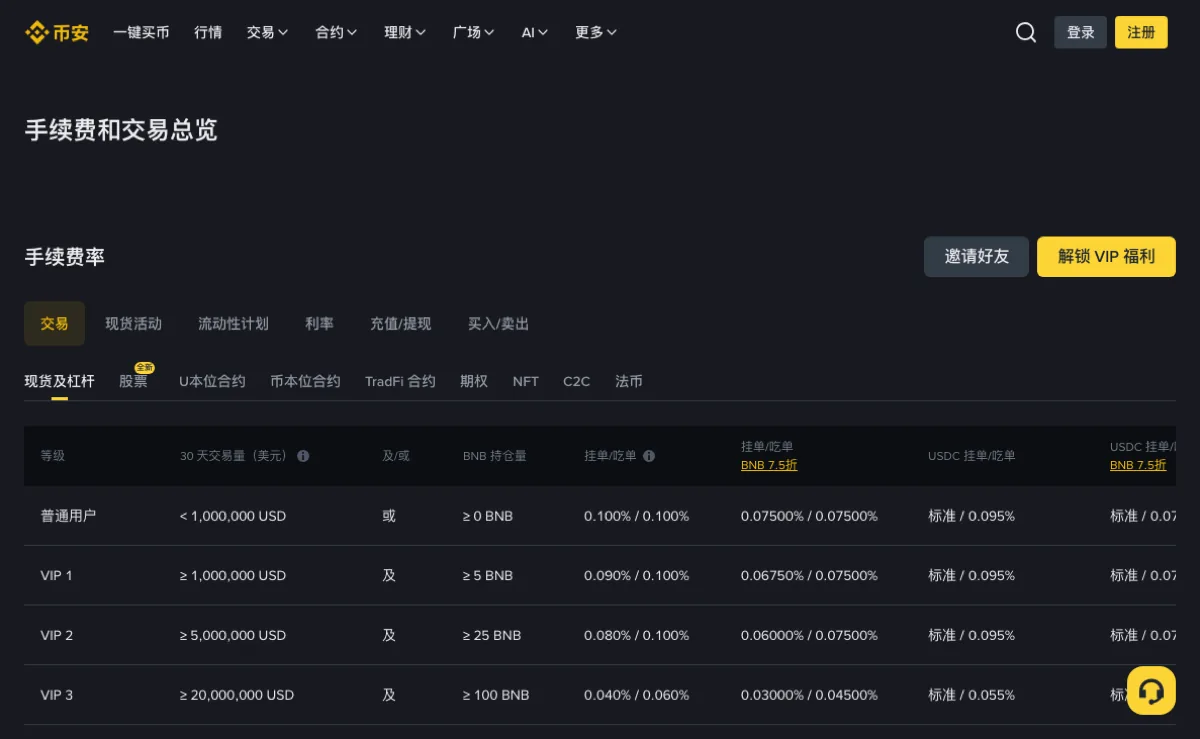
A limit order can execute as a taker if it immediately matches available liquidity. Read the fill record rather than inferring the fee category from the order label alone.
Choose the record before choosing a percentage
Start with one completed order you want to reconcile. Note its trading pair, order identifier and execution time, including the time zone used in the export. If the order has several fills, retain their individual rows. The amount requested in the order is not necessarily the amount executed, so using the requested amount as the fee base can overstate the expected charge.
For a spot fill quoted as price times base quantity, that multiplication gives the executed quote value. For example, a hypothetical purchase of 0.2 units at 50 USDT has a value of 10 USDT. At an assumed 0.1% fee, its quote-value equivalent is 0.01 USDT. This example shows the arithmetic only; it does not identify the asset actually used to pay that fee.
Keep the downloaded record unchanged and do calculations in a copy. That makes it possible to distinguish a number reported by the platform from a number you calculated later.
Identify the rebate you actually receive
Binance's Referral Pro FAQ splits the money in two. The referrer earns a commission, 20% of spot fees at the default tier. When creating the referral link, the referrer decides whether to share part of that with you, and the share cannot be edited afterwards. If they chose zero, you receive nothing, whatever the banner said. Do not copy a referrer's commission tier into your own cost calculation.
Check the confirmed relationship on the referral page. A missing menu or blank screen is not enough to conclude that no relationship exists. If the information is unclear, use the official account or support flow to confirm it.
Rebates are calculated every hour, converted to USDC and paid into the Spot account; the same Referral Pro FAQ states that the converted amount is deposited within six hours (checked in October 2026). Look for them there, not in the fill record of the trade. Record the amount, time and account for each credit.
Handle a missing rebate without inventing a cause
There are several different observations: the referral information did not load; a relationship is confirmed but no relevant credit is visible; or a credit exists but is not in the account you expected. Record which observation applies. A relationship with no credits may simply mean the referrer set your share to zero, so none of these alone means the code was invalid.
Allow for the hourly calculation and posting delay when comparing trading and rebate records. A trade late in one displayed day and its credit can fall into different export ranges, so inspect timestamps before calling a credit missing.
Where a record does not identify an individual trade, do not force a one-to-one match from similar amounts. Reconcile at the level actually supported by the record, and mark unmatched items for clarification.
Verify that BNB was used for the fee
The example assumes a 25% BNB payment discount, expressed as a factor of 0.75. Applying it requires that the relevant product and account qualify and that the fee is actually deducted under that arrangement.
Check the payment setting and the fee asset in the fill record. A displayed switch alone does not show how a particular fill was charged. BNB holdings also expose you to its price changes, which are separate from the fee saving.
Compare unlike fee assets carefully
A fee deducted in BNB cannot be subtracted directly from a USDT rebate as though the two numbers used the same unit. Keep the original asset amounts first. To compare their value, use an explicitly chosen valuation source and time, or use a value provided in the official record if it serves that purpose.
For an illustrative worksheet, suppose a fee is 0.002 units of a fee token and the chosen valuation is 500 USDT per unit. The fee's estimated value is 1 USDT. If the token later trades at 550, the original fee quantity has not changed; only the later valuation is 1.10 USDT. Label that valuation difference instead of reporting it as an extra exchange charge.
A portfolio's changing BNB value is therefore a separate calculation from whether a particular trade received a payment discount.
Keep the charge and the rebate in two ledgers
Think of every trade as producing two entries. The first is the fee Binance takes when the order fills. The second is any referral rebate that arrives afterwards as a USDC credit. They are booked at different times, in different places and not necessarily in the same asset.
| Ledger | What goes in it | Example |
|---|---|---|
| 1 · Trade charge | Fee at your tier's rate, deducted at execution | 0.100% = 10 USDT; paid in BNB at 0.075%, about 7.5 USDT worth of BNB |
| 2 · Referral rebate | The share your referrer chose to pass on, credited later in USDC | Whatever the credit record shows; can be 0 |
Binance has not published how the rebate is worked out when the fee was paid in BNB. Its FAQ says spot rebates have been based on net fees (after maker rebates) since 29 April 2026, and says nothing more about the calculation. So there is no official single “effective rate” to compute in advance. Fill in ledger 1 from the fill record, ledger 2 from the actual USDC credits, and only then subtract one from the other if you want your own net-cost figure.
Reconcile a partially filled order
Consider a hypothetical order requesting 1,000 USDT of executed value but filling only 600 USDT before cancellation. At an assumed 0.1% rate, the calculation starts from the 600 that executed, producing 0.6 USDT before any qualifying adjustments. Applying the rate to 1,000 would create a discrepancy unrelated to referral benefits.
If several fills use different rates or fee assets, calculate each row separately and then total compatible amounts. A single average rate may be useful as a summary, but it should be the result of that calculation. It should not replace the underlying fill records or erase which portion received which treatment.
Retain the canceled remainder in the order-status record. It explains why the requested amount and the executed amount differ without requiring an imagined missing trade.
Investigate a small rounding difference
Do not compare a rounded screen total with a calculation using more decimal places and immediately call the difference an overcharge. Check whether an export provides more precision, how many fills the order contains and whether every amount is in the same unit. Keep the available original precision in the worksheet, then round only the displayed summary.
For example, two hypothetical fees of 0.004 and 0.004 total 0.008. A screen showing two decimal places could make the separate display look different from the total. The example illustrates a display issue; it says nothing about Binance's rounding rule for any product. If the actual export does not explain the difference, ask which precision and rounding treatment applied instead of assigning your own rule.
Also check for duplicate imports when combining several downloads. Overlapping date ranges can include the same fill twice. Use the available identifiers, timestamps and quantities together to inspect suspected duplicates; similar amounts alone are not enough to delete a row.
Recheck the calculation after a tier change
A different VIP tier changes the base rate, and it can end the referral rebate. Once a referred account reaches VIP 3 or above, it stops generating spot and margin rebates. Use the new maker or taker rate from that point and expect no further spot credits.
For example, if the relevant base rate were 0.09%, the same 10,000 trade would start at 9 USDT before any further applicable adjustments. Do not use the ordinary 0.1% rate to estimate a trade already charged at another tier.
Separate the transaction date from today's account tier
When reviewing an older trade, today's account screen may show a different tier, payment setting or program arrangement. Write down the execution date and look for the conditions applicable to that period. If you cannot establish a historical rate, identify that evidence gap rather than presenting the current rate as a verified historical fact.
The same discipline applies to promotional trading pairs. A current banner does not prove that the promotion covered the earlier execution, and an expired banner does not prove the earlier trade was ineligible. Check the covered pair, product, start and end conditions and any exclusions.
For an account with sub-accounts or a separately negotiated arrangement, confirm which account policy applies before using an ordinary retail example. The arithmetic cannot resolve an unknown entitlement.
Keep products and fee types separate
Futures use their own fee and referral rules. A spot percentage cannot automatically be applied to a futures trade, and a referrer's futures commission is not necessarily the rebate received by the user.
Trading fees, funding payments and withdrawal charges are different costs. A referral benefit for trading fees does not make funding, slippage or liquidation losses refundable. Leveraged positions can lose their entire margin; a lower trading fee does not reduce that market risk.
Reconcile the records, then use the calculator
- Identify the product, pair, tier and maker or taker status.
- Read the actual fee amount and asset from each fill.
- Check whether the BNB payment arrangement applied.
- Match any confirmed referral credit to the relevant records.
- Subtract confirmed credits from the charge when calculating effective cost.
The fee calculator is a local illustration. It does not read your account. Enter the correct base rate and treat any preset rebate percentage as an assumption that needs confirmation.
If the figures still do not reconcile, retain the records and calculation conditions for official support. Do not assume in advance that either the platform or your calculation must be wrong.
A worksheet that preserves the unresolved items
| Column | Purpose |
|---|---|
| Order and fill identifiers | Keep several executions from being counted as several complete orders. |
| Executed value and fee asset | Separate the calculation base from the asset actually charged. |
| Reported fee | Preserve the platform's original amount before converting units. |
| Confirmed rebate | Record the actual credit and its asset, rather than an expected maximum. |
| Valuation convention | Explain how unlike assets were converted for comparison. |
| Unresolved difference | Keep an unexplained amount visible for follow-up. |
A useful support question includes one example and the assumption producing the difference: “For this fill, the record shows this fee asset and quantity; using this rate gives this result. Which rate or condition applied?” That is more actionable than sending a screenshot of the entire wallet balance.
Share evidence only through the official channel and according to its requirements. Keep an unedited original privately; do not publish account identifiers or unrelated financial activity to crowdsource an explanation.
Treat promotional coupons as a separate entitlement
A voucher can have an expiry, product restriction, face value and other conditions. It may be applied at a different time from a referral rebate. Read the voucher rules before combining it with a calculation.
Trial funds, rewards and an amount labeled pending are not necessarily withdrawable cash. Keep their records separate so an expired coupon or an unclaimed reward is not mistaken for a fee discrepancy.
A coupon is not cash until its conditions say so
Read whether a coupon reduces an eligible fee when charged, reimburses it later, or requires a claim. These descriptions lead to different entries in a worksheet. If the coupon applies only to one product, a trade on another product should not be included merely because both are shown under the same account.
In a hypothetical comparison, a 5 USDT coupon covering up to that amount of eligible fees does not imply that every account with the coupon has received 5 USDT in spendable funds. Record the eligible use, remaining entitlement and any actual credit separately. Do not count the face value once as a discount and again as a rebate.
Before deciding a saving was achieved, finish the reconciliation: compare the relevant charge with confirmed applicable benefits. Additional trading volume, token price movement and bank or withdrawal costs belong in separate calculations, even when they occurred during the same session.
Check eligibility before registering for a benefit
If you have decided to register, the signup guide explains where the referral field appears. HuiBonus uses BN5785. Before counting on a rebate, check the regions where referral rewards are not paid at all.
Does a referral code turn the 0.1% fee-schedule row into 0.08%?
No. The trade is charged at the normal rate and the fee schedule stays the same. Any share the referrer passes on is calculated hourly and credited to your Spot account in USDC afterwards.
Is there a formula that combines the BNB discount and the referral rebate?
Not an official one. Binance has not published how the two interact, so keep the BNB-discounted charge and the USDC rebate as separate records.
Can I apply the spot 20% to futures fees?
No. Futures have their own referral rules. A referrer's commission percentage is also not the same as the share passed on to the referred user.
Do high VIP tiers still pay a referral rebate?
Not on spot. Once the referred account reaches VIP 3 or above, it stops generating spot and margin referral rebates.
Are promo fee coupons the same as a referral rebate?
No. Coupons have their own expiry, amount and product conditions. Track coupon use separately from any referral rebate.