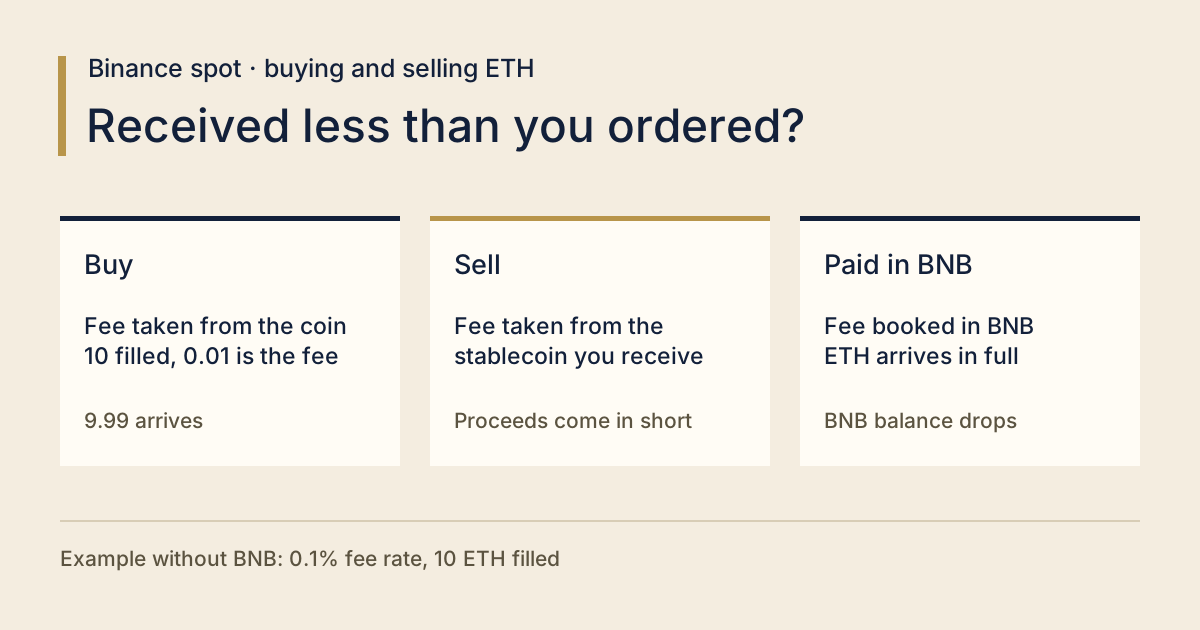
Put in a buy for 10 ETH on Binance and the spot wallet goes up by 9.99. Before blaming the fee, check the fill: if all 10 filled, the fee came out of the ETH and the rate was 0.1%, then the missing 0.01 ETH is the fee. If only part of the order filled, the unfilled quantity was never bought, so it can't all be counted as fee.
That sum comes straight from Binance's help page on calculating spot trading fees. Its example is a regular user at 0.1% buying 10 ETH at 3,452.55 USDC each: fee = 10 ETH × 0.1% = 0.01 ETH, so 10 − 0.01 = 9.99 ETH lands. The USDC side is the trade value, 34,525.5 USDC, and nothing extra comes off it.
Selling on Binance spot: is the fee taken from the coin or the USDT?
From what you receive. With the BNB discount off, a sell pays its fee out of the coin the sell brings in. Sell ETH for USDT and the fee comes off the USDT; the amount of ETH you sold isn't touched by it.
The help page puts it in one line: "Trading fees are always charged in the asset you receive." Buy ETH/USDC and the fee is paid in ETH; sell ETH/USDC and it's paid in USDC. Swap in ETH/USDT and, without BNB, the sell side pays in USDT.
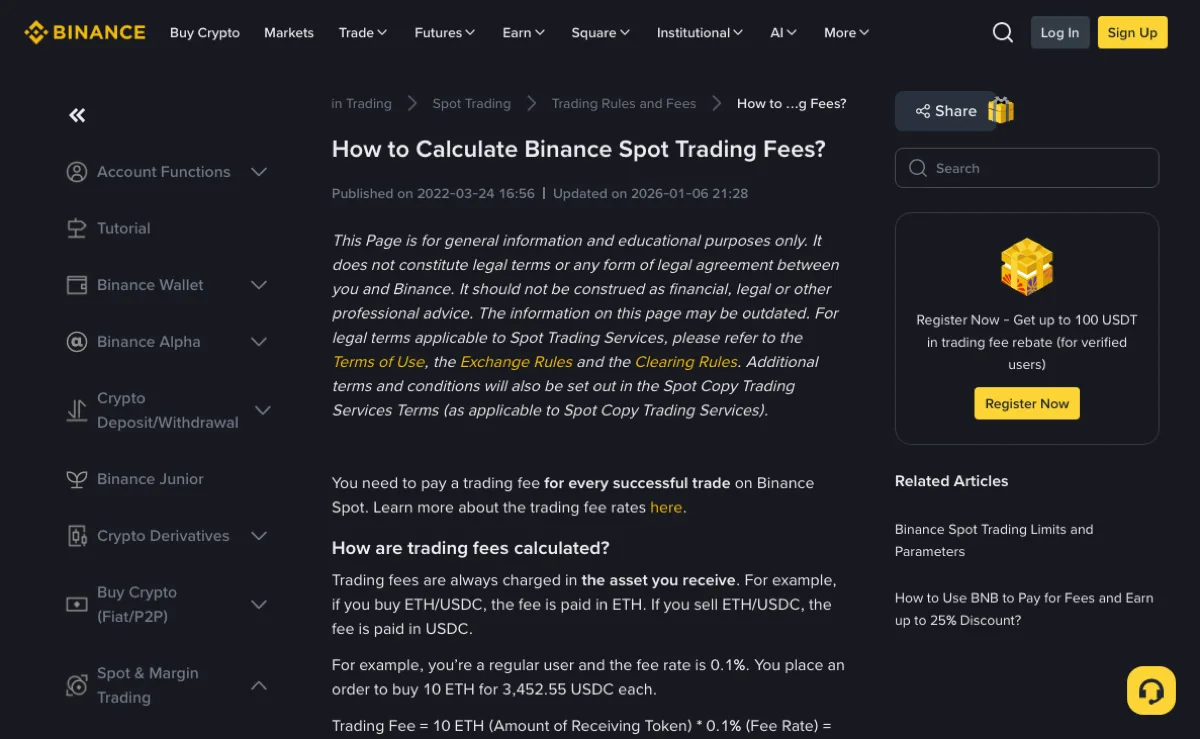
Same page, sell side: 10 ETH sold at 3,452.55 USDC each, fee = (10 × 3,452.55) × 0.1% = 34.5255 USDC. Trade value 34,525.5 USDC, minus the fee, leaves 34,490.9745 USDC in your account.
And the 0.01 ETH on the buy — what is that in money? At the same price, 0.01 × 3,452.55 = 34.5255 USDC. Exactly what the sell cost. Same percentage on both legs; the only difference is which coin it's taken from.
So when you copy numbers off a trade, keep "amount filled" and "fee" in separate columns. Mix them and the missing coins never reconcile.
Paying fees with BNB: does the amount still come in short?
For an ordinary ETH/USDT or ETH/USDC spot order like the ones above: once the fee is actually charged in BNB, nothing comes off the ETH or the stablecoin you receive. Your BNB balance drops instead. You still only receive what filled, though — order 10, get 6 filled, and 6 is what you have.
Binance's page on paying fees with BNB sets two conditions: there has to be BNB in your Spot account, and the BNB deduction has to be switched on.
- Website: on the spot trading page click [Fee Level] and toggle [BNB/USDT]; or go to the Fees & Transactions Overview page and use the switch under [BNB Discount].
- App: [Account Center] → the [Settings] icon top right → [BNB Discount], then turn on [Use BNB to pay fees]. The same switch also sits under [Trade] → [Spot] → [...] → [Fee].
Both are the same setting, just reached from different screens.
Read in October 2026, the two help pages still give 25% off spot fees when paid in BNB, so you pay 75% of the normal fee; the page notes the discount is valid until further notice. Your actual bill is whatever your account's fee rate and the trade's fill record say. On the sell example above, 34.5255 × 0.75 = 25.894125, so about 25.89 USDC worth of fee is paid in BNB, and the full 34,525.5 USDC lands.
Now per month. Say your buys add up to 1,000 USDT of trade value a month at 0.1%. Without BNB the fees come to 1 USDT; paid in BNB, 0.75 USDT. That's 0.25 USDT a month, and your sells are a separate sum. To try your own volume and rate, the fee layers tool runs the numbers on assumptions you enter. BNB's own price moves too, so work out how much BNB you'd be holding to save that 0.25 USDT before you buy any for this.
Switch on and the amount still short? Look at which asset this particular trade was actually charged in, then check whether the Spot account had enough BNB — the same page says an insufficient balance means the original fee is charged. It lists two more exceptions: an asset priced below 0.00000001 BNB doesn't qualify, and trading bots (Spot Grid, DCA and the like) take the full fee first, then credit a refund to your Spot account. And if the coin you bought is BNB itself, the net increase in BNB isn't your filled quantity with no fee taken.
| Case | Fee charged in | Fee amount | What arrives |
|---|---|---|---|
| Buy, BNB discount off | ETH | 0.01 ETH | 9.99 ETH |
| Sell, BNB discount off | USDC | 34.5255 USDC | 34,490.9745 USDC |
| This ETH buy or sell, fee actually paid in BNB | BNB | 75% of the fee, converted to BNB using Binance's average conversion rate for non-BNB pairs | Buy: 10 ETH. Sell: 34,525.5 USDC |
Whether a referral discount stacks with BNB is covered in the referral rebate and the BNB fee discount. Referral cashback is paid after the trade, separately; it doesn't change which coin this trade's fee came out of.
Where to check the fee charged on a Binance spot trade
Open your spot orders and go to Trade History, then filter by pair and time to find the trade. The help page's answer to "How can I check the fees charged?" points to the same place.
- Find the trade in spot Trade History and match the pair, the side (buy or sell) and the time.
- Write down three things: amount filled, fee amount, and which coin the fee is in.
- Fee in the coin you bought: filled − fee = what arrived. 10 − 0.01 = 9.99. If that matches, the trade is fine.
- Fee in BNB, and you bought a coin other than BNB: what arrived equals the filled amount, and the BNB fee is a separate line. If you bought BNB itself, take this BNB fee off as well.
- Want to check the rate? Put both numbers in the same unit first. Buy with the fee in ETH: 0.01 ETH ÷ 10 ETH = 0.1%. Sell with the fee in USDC: 34.5255 USDC ÷ 34,525.5 USDC = 0.1%. With the fee in BNB, convert that line to the same coin first. Dividing a BNB amount by an ETH amount gives you nothing.
A switch showing "on" doesn't prove the discount applied. Check the fee asset and the effective rate on that line. For non-BNB pairs such as ETH/USDT, Binance's BNB fee FAQ specifies an average conversion rate rather than the spot rate at that instant. A calculation using a single BNB price can therefore differ from the recorded charge.
If one order shows up as several rows in Trade History, add the fee row by row; the method is in checking fees when a spot order fills in parts.
How much to order on Binance so at least 10 ETH arrives
When the fee comes out of the coin you buy and the rate is fixed, what arrives = amount filled × (1 − fee rate). To end up with at least 10 ETH at 0.1%, you need 10 ÷ 0.999 = 10.010010… ETH filled, rounded up to the order step. And the order has to fill completely for the result to hold.
You may not be able to type that number in. Binance's trading parameters page lists a minimum quantity step for each pair, and the order quantity has to be a whole multiple of it. On 14 October 2026 it read: ETH/USDT 0.0001 ETH, BTC/USDT 0.00001 BTC, XRP/USDT 0.1 XRP, XLM/USDT 1 XLM, with a 5 USDT minimum order size on all four. These parameters change; open that page for the current figures before you place the order.
With a 0.0001 step, 10.01001 has to be rounded. Compare the two quantities either side of it. Enter 10.0101: 10.0101 × 0.999 = 10.0000899, which is 0.0000899 over 10. Enter 10.01: 10.01 × 0.999 = 9.99999, which is 0.00001 short. If 10 is the floor, the number to enter is 10.0101.
Any other pair works the same way: target amount ÷ (1 − fee rate), rounded up to a whole multiple of that pair's step.
If this ETH buy is actually charged in BNB, 10 ETH filled means 10 ETH arrives and the fee leaves your BNB balance. Whether holding BNB is worth it still comes down to the fee saved weighed against BNB's price swings.
Why selling everything on Binance leaves a few coins behind
A fee taken on the buy, plus a coarse step on the sell, can leave an odd amount. Suppose you buy 50 XLM at 0.1%: 0.05 goes to the fee and 49.95 arrives. With the XLM/USDT step of 1 XLM read above, a sell has to be a whole number, so 49 is the most you can enter. 49.95 − 49 = 0.95 XLM that can't go into an order at that step on its own. Whether the 49 goes through also depends on the minimum order size.
A pair with a finer step behaves differently. Same setup, fee in XRP at 0.1%, 100 XRP filled: 0.1 goes to the fee and 99.9 arrives. XRP/USDT steps in 0.1 XRP, and 99.9 is an exact multiple of that, so the whole quantity fits in one sell order — it still has to clear the minimum value and actually fill.
On the sell side, a fee taken from the money you receive doesn't leave any coins to sell. If a sell fills partly or not at all, what's left is simply the unsold amount.
When the fee comes out of the XLM, you can check ahead: expected fill × (1 − fee rate), then see whether the result is a whole multiple of the sell step. Whatever sits beyond the last multiple won't fit in a sell order. On a pair with a step of 1, buying one extra doesn't necessarily fix it: 51 XLM × 0.999 = 50.949, sell 50 and 0.949 is still there. Don't place another buy just to round it off. Paying the fee in BNB avoids this leftover on the buy side, though the sell still has to meet the minimum and fill.
For the 0.95 already sitting in the account, see what to do with small balances.
The estimated fee before the order and the fee actually charged don't match. Is that normal?
Yes. Binance's help page says the [Est. Fee] shown on the trading page is for reference only, and the actual fee depends on the final amount of assets you receive from the executed trade. When the fee is paid in BNB on a non-BNB pair, the amount also depends on Binance's average conversion rate. To check, look at the fee on that line in Trade History.
Is the Binance spot fee always 0.1%?
No. 0.1% is the regular-user rate in Binance's worked example, and the same page notes fees may vary depending on your VIP level. The formula amount received = amount filled × (1 − fee rate) only applies when the fee comes out of the coin you bought; for orders actually charged in BNB, list the BNB fee separately.