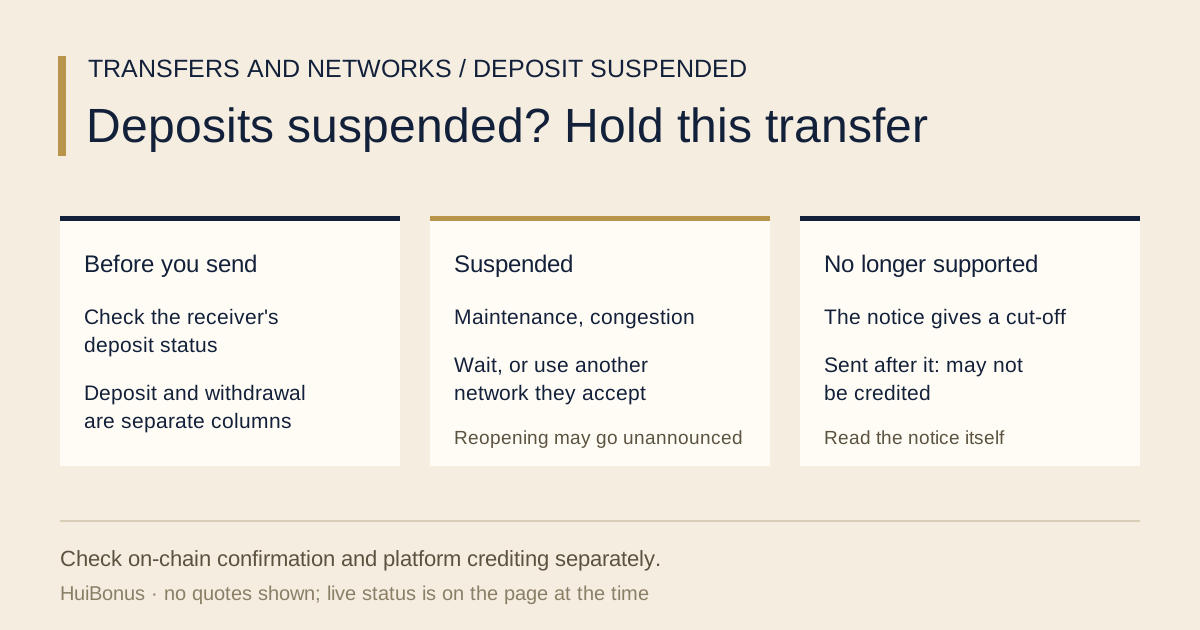
Say you are moving 300 USDT from another exchange into Binance. You open the deposit page, and next to the network you meant to use it says deposits are suspended. If you send anyway, what does it cost you?
Possibly a withdrawal fee paid up front, plus a wait for crediting to come back. A deposit suspension does not stop another platform from broadcasting your transaction; whether it confirms on chain depends on that network and that transaction. So hold this one and read the status first. Then read the wording closely, because "suspended" and "no longer supported" look alike on a page but mean very different things for your money.
What sending into a suspended network actually costs
Numbers first. Assume the sending platform takes a 1 USDT withdrawal fee out of the 300 USDT you typed and its page shows 299 USDT going out: 300 − 1 = 299. How much is taken from your transfer, and how, is whatever the withdrawal page shows at the time. From a self-custody wallet the network fee may be paid separately, so this subtraction does not carry over.
- The first item is that 1 USDT, the withdrawal fee shown by the sending platform. Once the transfer has confirmed on chain, a suspension at the receiving end does not undo it; what happens to the fee is down to the sender's rules.
- The second: suppose the 299 USDT has confirmed on chain but is not in your Binance balance yet. For as long as that lasts you cannot trade with it or move it out on Binance. If it is still pending on chain, check the network's status instead of just waiting for Binance to book it.
- The third is the one that stings. You lose patience and send again on another network. That is a second withdrawal fee, and the first transfer is no closer to arriving.
Only the first of the three can be counted. The second costs time, and the platform does not always say how much. The third you add yourself.
Where to check whether Binance has suspended deposits on a network
Look at the receiving side, not the sending side. The sender's withdrawal page only tells you whether it can send. Whether the other end is accepting is written on the other end's pages.
As of October 2026, Binance gives you two places to check the status. One is the deposit page itself: the Support article What Can I Do When Deposit/Withdrawal Is Suspended Due to Wallet Maintenance? says that if the network you want to use is in maintenance, a message appears on the screen, and that suspension messages are shown on both the App and the Website. The other needs no login: the public Deposit & Withdrawal Status page lists a deposit status and a withdrawal status for each coin.
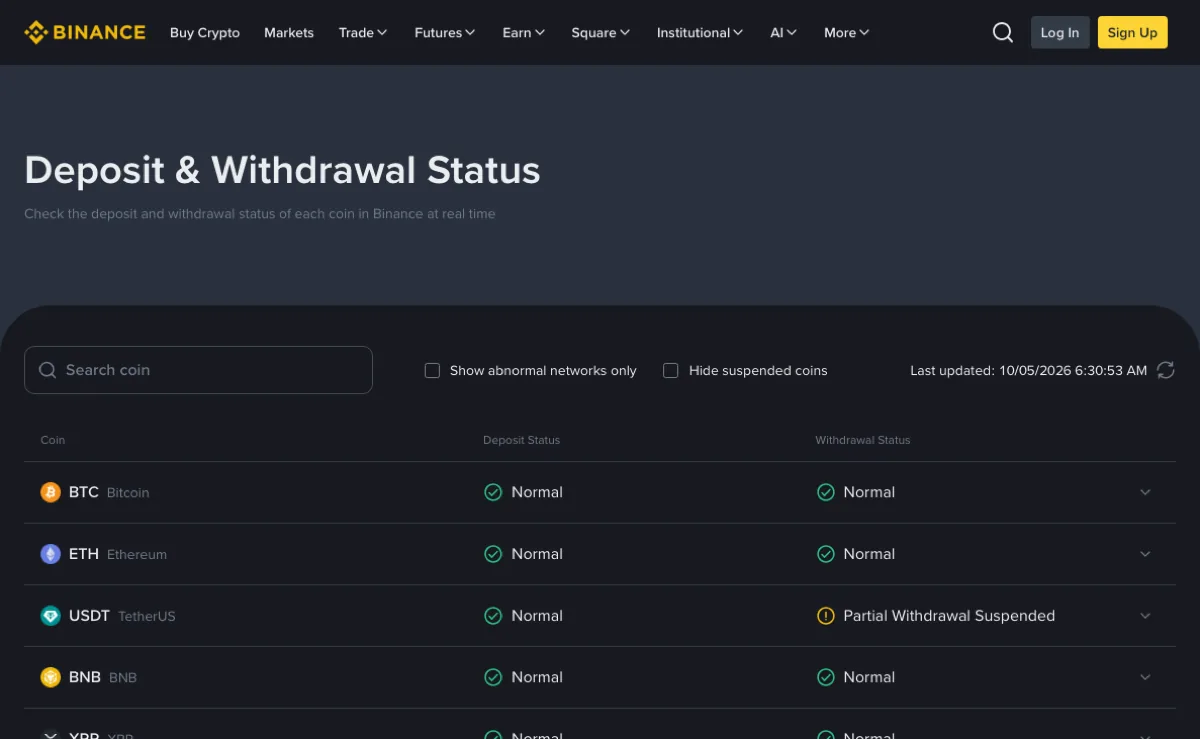
Three things on that page earn their place. "Last updated" at the top right tells you what time the status was read, which is that time and not now. The "Show abnormal networks only" checkbox clears the normal rows out of the way. Then there is the wording in the two status columns: when this screenshot was taken, the USDT row read "Normal" for deposits and "Partial Withdrawal Suspended" for withdrawals. This row shows that withdrawals are suspended on at least one network. It does not identify the network. The status page only gives the overview; for the network you plan to deposit on, go back to the deposit page, select it and read the notice there.
Deposit and withdrawal are two columns
For the same coin, deposits being normal says nothing about withdrawals, and the reverse holds too. Money coming in: Deposit Status. Money going out: Withdrawal Status. When both ends are exchanges, you need the sender's withdrawal status and the receiver's deposit status, one column on each of two pages.
Binance's Why Hasn't My Deposit Been Credited? puts this check ahead of the deposit as well: first confirm on the Deposit & Withdrawal Status page that Binance supports the token and the deposit network. Other platforms may have no public page like it. There, read the notice shown after you select the network on the deposit page, or their announcements. If you can't find a statement either way, count it as unconfirmed and don't send.
"Deposits suspended" vs "no longer supported": very different costs
Two kinds of wording turn up on pages and in announcements, and they need reading word by word.
| Wording on the page or notice | Usually comes with | Coins sent in afterwards |
|---|---|---|
| Deposits suspended (wallet maintenance, network upgrade, congestion) | A start time, an estimated duration, or a line saying it reopens when done | The help pages don't say how crediting is handled; check deposit history once it reopens |
| Deposits on a network no longer supported | A stated cut-off time | The notice says they are no longer accepted; a transfer may not be credited |
Two past announcements show the two patterns. "Wallet Maintenance for Tron Network (TRX) - 2026-07-23", posted by Binance's official announcement account, said the maintenance was expected to take about an hour and that deposits and withdrawals would reopen once the network was stable, with no further announcement. "Notice Regarding Zilliqa Mainnet Token Swap Deadline" (20 January 2020) stated that from 2020-02-15 12:00 (UTC) deposits of ERC20 ZIL would no longer be accepted. The first is a wait. The second is that network being closed to deposits.
For the transfer in front of you, read the current notice itself. Whether its body contains a phrase like "no longer accept deposits" or "cease support" matters more than its headline.
"No further announcement" means no second post. It doesn't mean no alert: the wallet-maintenance article's own suggestion is to click [Set Reminder] on the suspension notice, and you get a notification once deposits and withdrawals are back.
As for why deposits get suspended, the same article lists four reasons: software or hardware upgrades, a hard fork, congestion, and insufficient hot wallet balances. With congestion, confirmation on chain can be slow as well, so check the network's state and the platform's reopening notice separately instead of putting the whole wait down to crediting.
Already sent during the suspension: what happens to the coins
Separate what can be established from what can't.
The chain comes first. Take the transaction hash to a block explorer for the network you actually sent on and check the status, the token, the amount and the receiving address. Only when the right token shows as received at the correct deposit address is the on-chain transfer settled. Note the confirmation count too. Crediting by the platform is a separate, later step.
What can't be established is when it reaches your balance. "Why Hasn't My Deposit Been Credited?" lists wallet maintenance among the reasons, and all it says about it is that deposits are suspended while a wallet is under maintenance. Whether a transfer that arrives in that window is credited automatically afterwards or needs a request from you, neither help page says.
Keep the record, then act on what the chain and the platform show.
- Save the transaction hash, coin, network name, amount and time sent.
- Click [Set Reminder] on the suspension notice, or go back to the status page now and then and see whether that column has returned to "Normal".
- Once it reopens, go through your deposit history. If the deposit is there, check the amount. If it never shows up, take that record to support; Binance's Support Center also has an article titled "How to Retrieve a Deposit That Hasn't Arrived With Self-Service Recovery?".
The thing not to do is send a second transfer. Another one on the same network just turns one amount in limbo into two.
If it turns out the network isn't suspended but simply not supported by the receiver, that is a different problem. "Why Hasn't My Deposit Been Credited?" says that depositing via an unsupported network may lead to the assets being lost with no way to recover them.
In that case, work through the steps in what to do after sending crypto on the wrong network, in the order given there.
Wait for deposits to reopen, or switch to another network
The wallet-maintenance article's other option is to use another network for the deposit or withdrawal, if one is available. Work out two things before taking it.
First, whether the receiver takes it. A different network means a different set of receiving details: select the network again on the receiving side, fetch the address again, and on some networks fill in a memo as well. Changing only the sending network and reusing an address you haven't re-checked can put the coins on a network the receiver doesn't support. Addresses on different networks can look identical, and each item still has to be confirmed. The order for that check is in matching the receiving network.
Second, the difference in money. Withdrawal fees and minimum withdrawal amounts vary by network, so what arrives after the fee has to be read again off the withdrawal page for the new network; the thresholds are covered in small Binance withdrawals. If the original network charged 1 USDT and the alternative charges 3 USDT, the gap in fees is 3 − 1 = 2 USDT. If nothing has been sent and there is no hurry, waiting for the status to return is an option. Switching only picks another open route and doesn't promise instant crediting.
When both ends are on the same platform there is a route that skips the chain. An internal transfer doesn't go through a public network, so the suspended one doesn't come into it; whether it is offered depends on what the transfer page shows at the time. The two are compared in internal transfer versus an on-chain send.
Does a deposit suspension on one network stop me from trading?
Binance's wallet-maintenance article says you can still trade during system maintenance; only deposits and withdrawals are temporarily offline.